
NOAA Weather Unofficial (Pro)
Granite AppsWeather
4.88.08K Reviews
- Version
- 2.18.1
- Installs
- 100.00K
- Age Rating
- Everyone
Screenshots
Our Review of NOAA Weather Unofficial (Pro)
 Analysis by Appyee
When I need a quick answer about whether to carry a raincoat or shift a plan outdoors, I want a forecast that is easy to check without turning the decision into a research project. NOAA Weather Unofficial (Pro) is a paid weather app from Granite Apps, built around NOAA forecast information and radar. Its focus suits people who prefer a direct look at local conditions, though the best experience depends on setting up the location and making sure the information you are viewing is relevant to where you actually plan to be.
Where a weather check can get stuck
Weather apps can feel straightforward until a forecast appears to describe the wrong place, a radar view takes time to interpret, or a phone shows stale information. In practice, it helps to separate three questions: is the location correct, is the forecast time useful, and does the radar show a pattern that could affect the plan? I find that checking those in order is more helpful than repeatedly refreshing the screen.
This app is most useful when I want NOAA-focused forecast information and a radar view in the same weather routine. It is less suitable if I mainly want a polished lifestyle dashboard, broad international coverage, or a highly guided explanation of what every chart means. Those needs may be better served by another weather service designed around them.
First Impressions and Usability
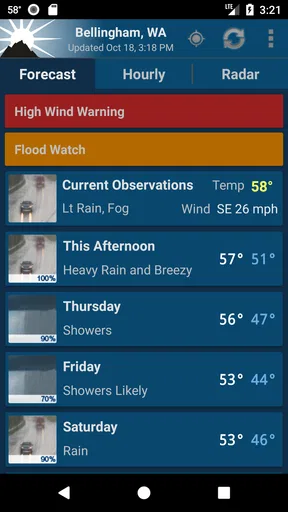
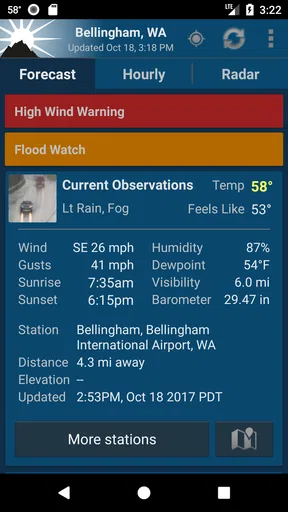
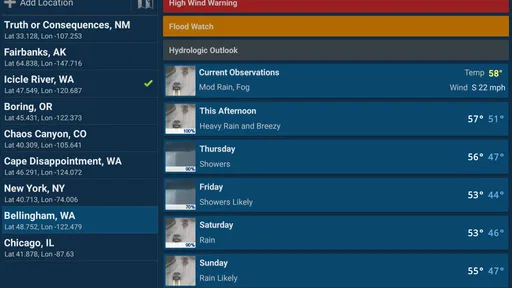
When I first opened the app, I was immediately struck by its clean and straightforward interface. The layout is intuitive, making it easy to navigate even if you’re not a weather geek. The main screen provides a snapshot of the current weather conditions, including temperature, humidity, and wind speed. It’s like having a personal weather station in your pocket!
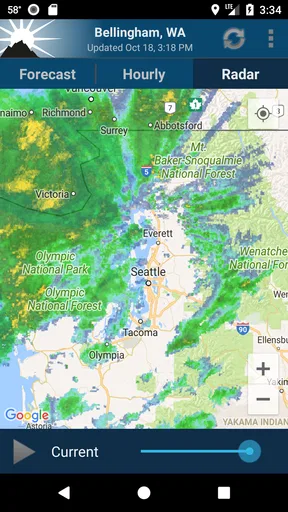
One of my favorite features is the radar map. It’s incredibly detailed and allows you to zoom in on specific areas to see real-time weather patterns. Whether you’re planning a picnic or just trying to decide if you need to take a raincoat, this feature is a game-changer.
Check the location before trusting the view
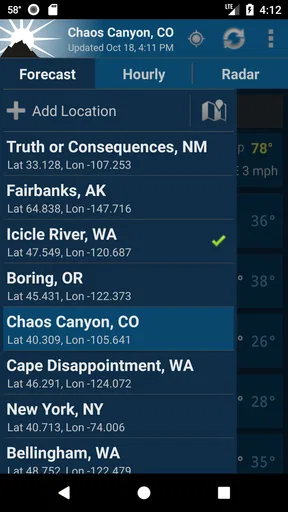
For a useful first setup, I would start by confirming that the displayed location matches the place where I need the forecast. If I’m checking conditions for a commute, my current position may be enough; if I’m planning a visit elsewhere, I would check that destination directly rather than assume the local view will answer the question. This small habit prevents a common weather-app mistake: making a sensible decision from information about the wrong area.
Radar also rewards a little patience. I use it to understand the broad direction and spread of precipitation, then compare that picture with the forecast timing instead of treating a single map glance as a guarantee. A radar image can help me decide whether to bring a waterproof layer, but I would not use it alone to make a safety-critical call or assume a storm will arrive at an exact minute.
In-Depth Weather Data
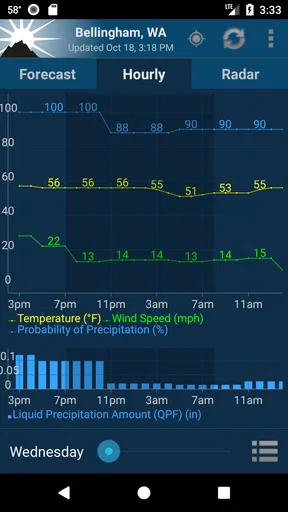
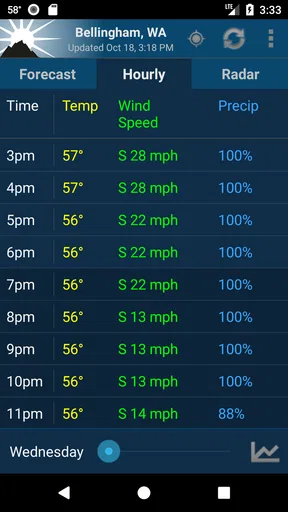
What sets the NOAA Weather Unofficial (Pro) app apart from others is its in-depth weather data. You get access to hourly forecasts, which are particularly helpful if you want to plan your day around changing weather conditions. The app pulls data directly from the National Oceanic and Atmospheric Administration (NOAA), so you know you’re getting accurate and up-to-date information.
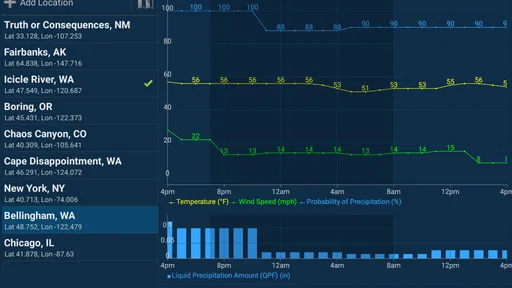
For those who love to dig deeper, the app also provides detailed graphs and charts. You can view trends in temperature, precipitation, and even track the movement of storms. It’s a weather enthusiast’s dream come true!
Make the forecast useful for a real day
Hourly detail is most valuable when a decision has a time attached to it. If I have a walk, school pickup, or outdoor errand later in the day, I can compare the conditions around that window rather than relying only on the broad daily outlook. A practical approach is to check once while planning and again closer to leaving, especially when the radar suggests conditions are changing.
The graphs can help answer a different question from the hourly forecast: not just “What might happen during my trip?” but “Is the overall trend getting warmer, wetter, or windier?” I would use them as context, not as a reason to overanalyze every small fluctuation. For everyday planning, a clear trend is often more helpful than trying to interpret every detail.
Setup checks and alert choices
Customization is key with this app. You can set up notifications for severe weather alerts, so you’re always in the know when it comes to storms or extreme conditions in your area. The app allows you to customize which alerts you receive, so you’re not bombarded with unnecessary information. Trust me, once you’ve set up your preferences, you’ll wonder how you ever lived without it.
The widget feature is another handy tool. You can add multiple widgets to your home screen to keep an eye on different locations at a glance. It’s perfect for those of us who travel frequently or just want to keep tabs on the weather in our hometowns.
I’d choose alerts deliberately rather than turning on every notification by default. An alert is useful when it can change what I do, while too many interruptions can make it easier to ignore the important one. For a household with different routines, I would also decide which location matters most for each person before relying on a quick glance at a widget.
If a widget or alert does not seem current, I would first open the app and check the location and forecast there. Then I’d check whether the phone has a working connection and whether its general background activity settings allow apps to refresh. These are safe, ordinary checks; they do not assume that the app itself is broken. If the forecast still seems inconsistent, comparing the same place and time across views can help identify whether the issue is location, timing, or a temporary data delay.
Performance and Reliability
Performance-wise, the app runs smoothly with no noticeable lag. The data updates quickly, and I’ve yet to experience any crashes or bugs. It’s clear that the developers have put a lot of effort into ensuring a seamless user experience.
One thing I appreciate is the app’s low data consumption. Even when using the radar map, it doesn’t drain your data plan, which is a huge plus if you’re on the go and need to check the weather frequently.
Still, weather information relies on more than the app interface. A weak connection, a phone that has not refreshed its view, or a forecast that changes as conditions develop can all affect what appears on screen. If the radar looks blank or the information seems old, I would try a normal connection check and reopen the view before assuming the service is unusable. For urgent conditions, I would not make this app my only source of safety information.
Who benefits most from this approach?
I can see this being a good fit for someone who checks local conditions often, likes having radar available, and wants more detail than a simple current-temperature tile. It also makes sense for people who keep an eye on more than one place, such as a home location and a regular destination, because the widgets can make those checks quicker.
It is not the obvious pick for someone who wants a free option above all else, since the app costs $1.99, or for a person who prefers a very simplified forecast with little detail to interpret. The app is rated Everyone, has an average rating of 4.8 from around 18,000 ratings, and has been installed over 100,000 times. Those figures offer a useful sense of its audience, but I would still judge it by whether its NOAA-oriented style and tools fit my own routine.
How it compares with familiar weather apps
Compared with a phone’s built-in weather view, this app’s appeal is its focus on NOAA information, radar, and more detailed forecast views rather than just a quick glance at the day. Compared with weather apps that emphasize maps, lifestyle presentation, or multiple kinds of guidance, its value is a more direct forecast-and-radar workflow. That focus is a strength if those are the details I actually use; it is less compelling if I want a broad, highly visual overview or a service centered on other regions and needs.
A realistic routine might be checking the hourly outlook before leaving work, opening radar to see whether rain is near the route home, and keeping a raincoat handy if the timing looks uncertain. The useful trade-off is that I get more context than a single rain icon, but I have to interpret that context myself. I would rather spend a moment checking the time and location than treat any one visual as a promise.
Is It Worth the Price?
Now, let’s talk about the cost. The pro version of the app is a paid upgrade, but in my opinion, it’s worth every penny. The enhanced features and lack of ads make for a more enjoyable experience. Plus, you’re supporting the developers who keep the app running smoothly and updated with the latest data.
If you’re someone who relies on accurate weather information and appreciates a well-designed app, the investment in the pro version will likely pay off. It’s like having a meteorologist at your fingertips!
Final Thoughts
In conclusion, the NOAA Weather Unofficial (Pro) app has become an essential tool on my phone. Whether I’m planning a hike or just trying to avoid getting soaked on my way to work, this app has got me covered. Its combination of accuracy, customization, and ease of use makes it stand out in the crowded field of weather apps.
If you’re looking for a reliable weather app that offers more than just the basics, I highly recommend giving this one a try. Who knows, it might just change the way you plan your days!
Granite Apps’ weather app has been available since February 22, 2012, and its current version is 2.16.2, with Android support starting at version 4.4. I would keep that compatibility in mind before choosing it for an older device. For a newer phone, the more important question is whether I want NOAA-centered forecasts, radar, and configurable alerts enough to justify a paid app rather than sticking with the default weather screen.
My practical verdict is that this is a good choice for a curious, hands-on weather checker who will use its maps and forecast detail, not just open it once to see the temperature. I’d skip it if I rarely look beyond a daily summary, need a different kind of regional service, or would rather avoid interpreting radar. For my own plans, its strongest role is as a useful planning aid: check the right location, look at the time that matters, and use the radar as context rather than certainty.
Verdict
Strengths of NOAA Weather Unofficial (Pro)
- Accurate real-time weather updates.
- Customizable alerts for severe weather.
- Detailed radar and satellite imagery.
- Ad-free experience enhances usability.
- Multiple location tracking available.
Limitations of NOAA Weather Unofficial (Pro)
- Requires a paid version for full features.
- Occasional app crashes reported.
- Interface feels outdated for some users.
- Limited widget customization options.
- Some features need internet connection.
Other Releases by Granite Apps
View All
NOAA Weather Unofficial
Weather4.7
Similar Picks in This Category
View All
Weather - By Xiaomi
Xiaomi Inc.4.1

Weather & Radar Forecast
WetterOnline4.8

Weather
OneLouder Apps4.6

AccuWeather: Weather Radar
AccuWeather3.6

The Weather Channel - Radar
The Weather Channel4.6

1Weather Forecasts & Radar
OneLouder Apps4.3
Frequently Asked Questions
What features does NOAA Weather Unofficial (Pro) offer?
NOAA Weather Unofficial (Pro) provides detailed weather forecasts, radar maps, and live weather updates directly from NOAA. Users can access real-time alerts, hourly forecasts, and a 7-day weather outlook. It also includes widgets for quick home screen updates and customization options for a personalized experience.
Is NOAA Weather Unofficial (Pro) user-friendly?
Yes, the app is designed with an intuitive interface that is easy to navigate. Users can quickly access weather data and forecasts with minimal effort. The app also offers customization options, allowing users to tailor the information displayed according to their preferences, making it accessible for all levels of tech users.
Does the app require internet connectivity?
Yes, NOAA Weather Unofficial (Pro) requires an internet connection to fetch real-time data and updates from NOAA. While some information may be cached for short-term offline access, an active connection is necessary for the latest weather updates and radar images.
Are there any ads in the Pro version of the app?
No, the Pro version of NOAA Weather Unofficial is ad-free, providing users with an uninterrupted experience. This is one of the main advantages of upgrading from the free version, as it allows users to focus solely on the weather data without any distractions.
How accurate are the weather forecasts in NOAA Weather Unofficial (Pro)?
The app sources its data directly from NOAA, one of the most reliable weather organizations. While no forecast can be 100% accurate, NOAA Weather Unofficial (Pro) offers some of the most precise and up-to-date weather information available, thanks to its direct link to NOAA's extensive data resources.
